-
Создана пользователем
 Неизвестный пользователь (gplotnikov). Последнее обновление: мар. 31, 2017
Время чтения: 2 мин.
Неизвестный пользователь (gplotnikov). Последнее обновление: мар. 31, 2017
Время чтения: 2 мин.
 | Getintent lets you use Report Biulder, which provides flexible adjustment to get the necessary reports with filtering and grouping. |
To build an available inventory report, go to the "Reports Builder" tab in the interface and select the "available inventory" dataset:
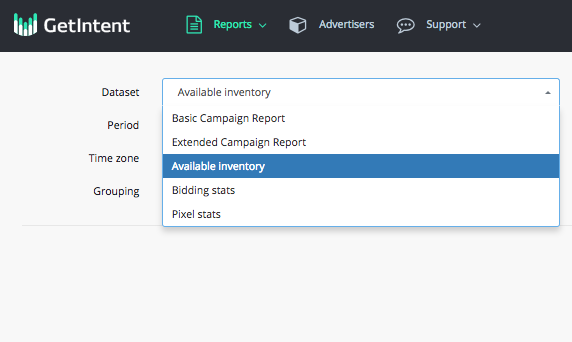
You will see the information of all the traffic that is available in self-service DSP Getintent.
Let's see an example of an available inventory report:
The amount of traffic available in Russia for the "Auto" context pages grouped by domains for 1 week
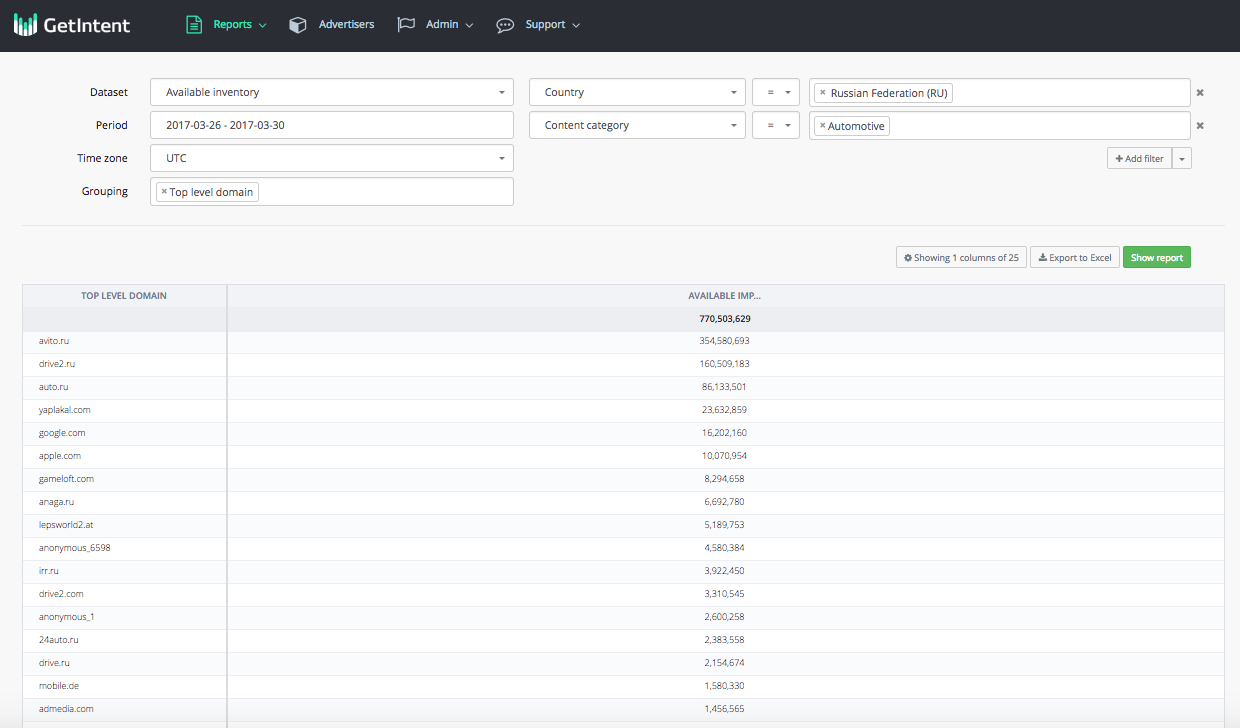
We can see two columns: domain name and the number of available impressions for it. It's better to include not much than 40% of the numbers in the report while preparing a media plan.
Some examples of the reports:
1. Available inventory report for Moscow grouped by device type for 1 day
3. Available inventory report for St.Petersburg for 300x250 banner size grouped by domains for 1 day