-
Создана пользователем
 Неизвестный пользователь (aloktev). Последнее обновление: авг. 07, 2017 ( Неизвестный пользователь (ebortnikova))
Время чтения: 2 мин.
Неизвестный пользователь (aloktev). Последнее обновление: авг. 07, 2017 ( Неизвестный пользователь (ebortnikova))
Время чтения: 2 мин.
Self-service DSP Getintent supports 3rd-party creatives.
Uploading 3rd-party creatives
3rd-party creative is an ad tag that calls another ad server, uploaded using JS or Iframe.
To upload a 3rd-party creative, choose the ‘3-rd party’ option in a menu in the "Creatives" tab.
Then you’ll see the 3-rd party creative adding window:
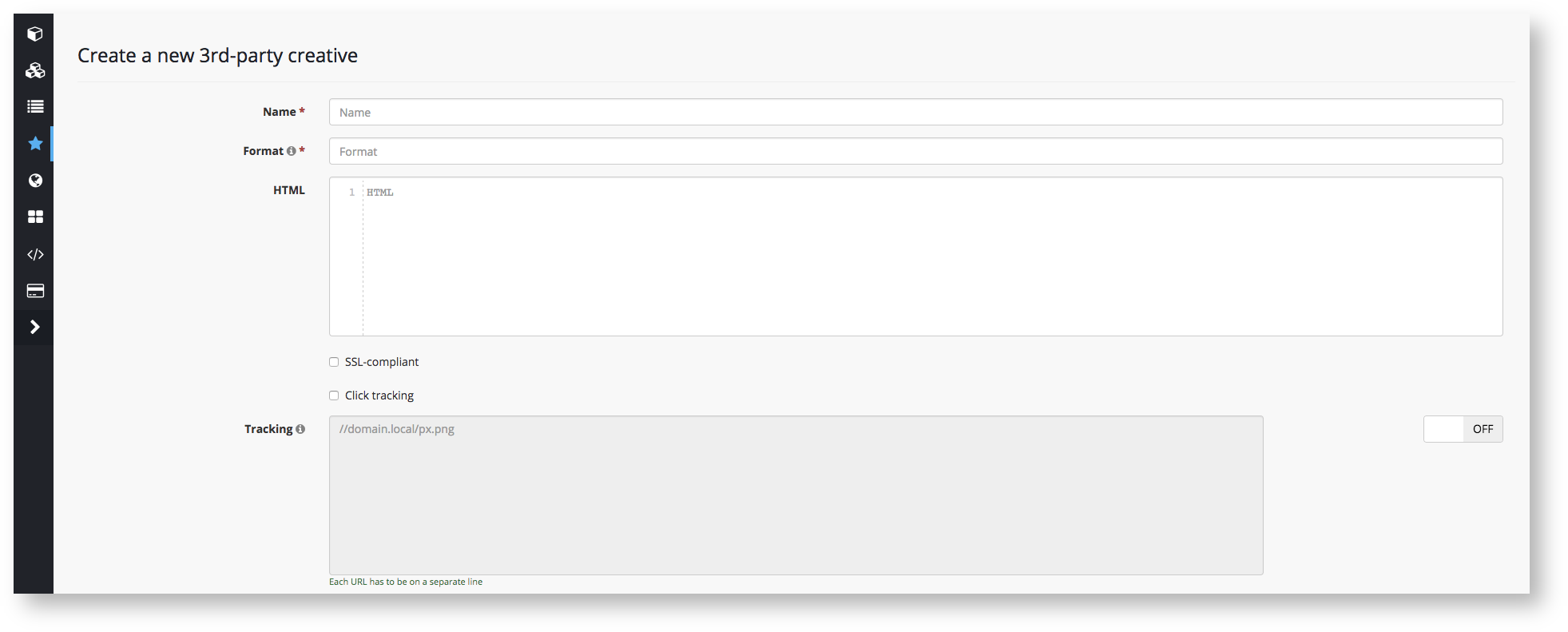
"Name" – enter a creative’s name
"Format" – enter a creative's format (eg: 240x400).
"HTML" – enter an ad’s code
"SSL-compliant" checkbox – tick if the code of your creative supports https.
Click tracking
For proper functioning of 3-rd party creatives in Self-service DSP Getintent you must add a click macro ( [[CLICK_PREFIX]] or [[CLICK_PREFIX_ENCODED]]).
It is needed for click tracking and using Target_CPC strategy.
Every 3-rd party system has its own rule for click macro adding. For correct click macro implementation you need to contact your code provider.
Examples of click tracking implementation for the most common 3rd-party creatives can be found here.